As I just finished using Canva to complete my very first flyer, promoting my very first book, I couldn’t help but to sit back and stare in awe at my piece of visually-appealing artwork. (See below.) Then, I mentally put focus on the true creative hero here, realizing that I largely owe my masterpiece to the ingenuity of Canva.
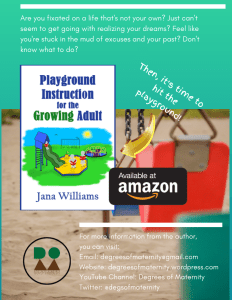
So, in recognition of how skilled Canva is in making us, content creators, look like we know what we’re doing in graphic design, I’d like to share my biggest take-aways from utilizing Canva’s services. Canva . . .
- can be used to fulfill a myriad of graphic design needs for all types of platforms. I’ve personally used it for:
- graphics and photos for this blog,
- graphics and photos for my YouTube channel,
- graphics and photos for my other social media platforms,
- business cards for Degrees of Maternity,
- flyers for Playground Instruction for the Growing Adult, and
- future presentations for public speaking engagements.
- is easy to use, user-friendly, fool-proof — basically a non-tech savvy person’s dream.
- I figured out how to navigate throughout the system by trial-and-error (just by playing around in it).
- I don’t think it’s possible to break Canva from my end, anyway. (If that were possible, I believe it would have happened already.)
- I’ve become good friends with Canva’s “undo” feature. (Love it, love it, love it.)
- provides helpful tools to assist users in taking full advantage of its offerings. Help comes in the form of:
- instructional guides,
- courses,
- tutorial, and
- an online “Help” section
- can be accessed by setting up a free account. Yes, I said free and there’s a lot you can access without paying a cent. However, keep in mind that you won’t have access to all design features without paying a monthly subscription fee or a one-time fee to access some of the options.
- offers good old quality graphics and pics that are visually aesthetic and helpful in creating “a look” for my business.
- allows you to be a graphic designer without having to officially carry around the artistic credentials for such a role. (Pretending I know what I’m doing is so empowering!)
- allows you to upload your own stuff to their system and add it to their stuff in their system to create your masterpieces.
- provides pre-made templates for those who have no desire to do heavy design lifting. (What a perfect no-brainer.)
- delivers a full design experience. You have access to different:
- text fonts, styles, and colors;
- backgrounds;
- types of content (graphic design for personal use, business, social media, promotional use, etc.);
- resizing and positioning options; and
- display and print options. Speaking of print options, Canva . . .
- prints out your materials (if you so choose) and ships them to you for a reasonable cost.
Canva has been a tried-and-true friend from my very beginnings as a content creator. I’ve truly appreciated the heavy lifting it’s done and I highly recommend to anyone looking for graphic design assistance.

 degreesofmaternity.com